Brown University Homepage Brown University Library

Updating Young Mindsets: Technology in the Library

In late September I saw an announcement about a computer science talk which referred to an acronym I wasn’t familiar with: CS4RI. A bit of googling led to the organization ‘CS4RI: Computer Science for Rhode Island'[1]. Its website included a link to their ‘CS4RI Summit 2016′[2], which stated as a goal: “The CS4RI Summit aims to inspire the next generation of computer scientists, entrepreneurs, and engaged tech sector employees… let’s excite students with the many educational and career opportunities that result from studying CS…”

Our Digital Technologes department is a vibrant place to work. We combine focused productivity with a culture of learning about new technologies and practices. And Libraries at our peer institutions are also known to be terrific places to work.

It occurred to me that while CS middle and high-school students would suspect that robotics or game-design organizations could be interesting places to work — they’d very likely never think that Libraries could be worth considering. A few of us set out to remedy that; we reserved an exhibit-table at the CS4RI Summit held at the University of Rhode Island on December 14, 2016.

It was a wonderful event. All sorts of interesting tech companies and organizations exhibited for some 1,500 students. At our exhibit, we talked about how Amazon and Google set the bar for making things easy to find, and easy to get — and how Libraries have worked hard to improve the discoverability and accessibility of our services. We shared that we’ve hired and are continuing to hire people with computer-science and other technology backgrounds. We noted that our Digital Technologies team gets to partner with researchers working on all sorts of interesting issues and technologies. And we let students know we work with, and contribute to, open-source technologies so that our work benefits not only our users, but a much wider community of learners.

A few hundreds of middle and high-schoolers now have some awareness that Libraries are worth considering for working with technology in a variety of creative, dynamic, and rewarding ways.

(For making this possible and successful, thanks to Bruce Boucek, Hector Correa, Jean Rainwater, Kerri Hicks, Patrick Rashleigh, and Shashi Mishra.)

[1] <http://www.cs4ri.org>
[2] <http://www.cs4ri.org/summit>

Django project update

Recently, I worked on updating one of our Django projects. It hadn’t been touched for a while, and Django needed to be updated to a current version. I also added some automated tests, switched from mod_wsgi to Phusion Passenger, and moved the source code from subversion to git.

Django Update

The Django update didn’t end up being too involved. The project was running Django 1.6.x, and I updated it to the Django LTS 1.8.x. Django migrations were added in Django 1.7, and as part of the update I added an initial migration for the app. In my test script, I needed to add a django.setup() for the new Django version, but otherwise, there weren’t any code changes required.

 Automated Tests

This project didn’t have any automated tests. I added a few tests that exercised the basic functionality of the project by hitting different URLs with the Django test client. These tests were not comprehensive, but they did run a signification portion of the code.

mod_wsgi => Phusion Passenger

We used to use mod_wsgi for serving our Python code, but now we use Phusion Passenger. Passenger lets us easily run Ruby and Python code on the same server, and different versions of Python if we want (eg. Python 2.7 and Python 3). (The mod_wsgi site has details of when it can and can’t run different versions of Python.)

Subversion => Git

Here at the Brown University Library, we used to store our source code in subversion. Now we put our code in Git, either on Bitbucket or Github, so one of my changes was to move this project’s code from subversion to git.

Hopefully these changes will make it easier to work with the code and maintain it in the future.

Python/Django Quicktips: Ordered JSON Load and Django Email Testing

Ordered JSON Load

Recently, I had the need to load some data from our JSON Item API in the same order it was created. When we construct the data, we use an OrderedDict to preserve the order and then we dump it to JSON.

In [1]: import json
In [2]: from collections import OrderedDict
In [3]: info = OrderedDict()
In [4]: info['zebra'] = 1
In [5]: info['aardvark'] = 10

In [6]: info
 Out[6]: OrderedDict([('zebra', 1), ('aardvark', 10)])

In [7]: json.dumps(info)
 Out[7]: '{"zebra": 1, "aardvark": 10}'

By default, though, the JSON module loads that data into a regular dict, and the order is lost.

In [8]: json.loads(json.dumps(info))
 Out[8]: {u'aardvark': 10, u'zebra': 1}

What’s the solution? Tell the json module to load the data into an OrderedDict:

In [9]: json.loads(json.dumps(info), object_pairs_hook=OrderedDict)
 Out[9]: OrderedDict([(u'zebra', 1), (u'aardvark', 10)])

Django email testing

Some of our django projects send out notification emails, to a user or a site admin. Django has the handy mail_admins and send_mail functions, but what if you want to test that the email was sent?

Django makes it easy to unit-test the emails – its test runner automatically uses a dummy email backend. Then you can import the mail outbox and verify its contents. Here’s a code snippet that tests an email being sent:

from django.core.mail import send_mail
def send_email():
    send_mail('Blog post', 'Test for the blog post',  digital_technologies@brown.edu',
 ['public@example.com'], fail_silently=False)

from django.test import SimpleTestCase
from django.core import mail

class TestEmail(SimpleTestCase):

   def test_email(self):
       send_email()
       self.assertEqual(len(mail.outbox), 1)
       self.assertEqual(mail.outbox[0].subject, 'Blog post')
       self.assertEqual(mail.outbox[0].body, 'Test for the blog post')

Note: you can’t import outbox from django.core.mail and check that len(outbox) == 1. This is because outbox is just a list, and it gets re-initialized to a new list before each test case.

What I Learned in Milwaukee

From Monday to Wednesday I had the great privilege of attending the annual Digital Library Federation Forum. DLF is the brand new host of the National Digital Stewardship Alliance, which convened its first annual meeting under new leadership immediately following the Forum. Four days, two conferences, and one election later, I’d like to share some reflections about my work and the work of others in my field. A bit of a disclaimer: between this year’s election results and two powerful keynote addresses, the week was emotionally charged for myself and many of my colleagues. We continually came back to the idea of care and inclusivity in our profession and the danger of idealizing neutrality. I’d like to clearly state that any opinions I express on this post, no matter how obliquely, do not necessarily reflect the official stance or policies of Brown University or the Library.

The DLF forum and NDSA meeting certainly saw their share of tool & workflow chatter. Two librarians from the University of Miami spoke on creating rights statements for 52,000 objects in their ContentDM repository. It was not a full-time project for either of them, so their presentation doubled as a master class in project management. They diligently built a matrix for assessing each object then used that tool over the course of a year to assign statements. Project management came up over and over. Two librarians, one from the University of Iowa and another from Emerson College, detailed their experiences in digital initiatives and shared their own PM techniques. They underscored the importance of relationship in the workplace, especially when managing and encouraging the work of coworkers they did not supervise.

It was surprising to me how many people were willing to get vulnerable about their work without openly eliciting pity. The most affecting presentation in that regard came from an archivist who attempted to accession the email archive of a defunct non-profit organization. Although an authority figure from that organization encouraged the accession, former employees were troubled by the idea. Apparently a select number of employees used a secret listserv to correspond privately about confidential matters. Employees had also used their professional email for delicate personal matters. The presenter tried to adjust the scope of the accession, but ultimately abandoned the project. We often learn about our colleagues’ most notable successes at conferences, but hearing a story of failure was empowering and educational. Hindsight is always 20/20, and her willingness to share some of those lessons meant a lot.

Vulnerability, in a lot of ways, feels like the antithesis of professionalism. We’re supposed to stay neutral and focus on the work, which should, itself, be neutral. But as the two keynotes I saw so clearly outlined, we are affected by our work and our work affects others. On Monday morning, Stacie Williams’s DLF keynote outlined how work and care are seen as separate acts, when often they are inextricably bound. Preserving information and delivering it to those who seek its edification, she argued, is an act of care. It’s impossible to talk about inclusion and diversity in our workforce or collections without recognizing the care involved with that work. Williams’s talk was in direct dialogue with Bergis Jules’s NDSA keynote, who spoke on Wednesday.

Jules’s words came the afternoon after the U.S. election, which had visibly affected the crowd. He spoke on care in libraries and archives and insisted that historical erasure is an act of violence. Jules played an interview with Reina Gossett, a Black trans artist and activist, who spoke on the historical isolation she felt from other trans women of color. This isolation led her to the archives and motivated her to make the movie “Happy Birthday Marsha!” about trans pioneer Marsha P. Johnson. Jules drew a direct line from Gossett’s historical isolation to the epidemic of Black trans murders in 2016.

“We have to ask ourselves, what do we owe these victims and the trans community, as fellow humans, as archivists, as culture keepers, and as people who’ve charged ourselves with deciding who gets remembered and who doesn’t? What do we owe communities that are constantly victimized because of erasure and by erasure?”

Saving these legacies, Jules said, is made complicated by prioritizing standards and technology over human relationships. Although standards are important, they can lead to elitism and exclusion.

“The more selective and specialized space of digital collections, prioritizes professionalism, technical expertise, and standards, over a critical interrogation of the cultural character of our records. So this is certainly an appropriate venue to ask questions about the diversity represented in our historical records. Because for digital collections, who gets represented is closely tied to who writes the software, who builds the tools, who produces the technical standards, and who provides the funding or other resources for that work.”

Our profession tells itself we should remain neutral and that #AllLivesMatter, but without active collecting of marginalized communities, how can we ensure that collecting around a white, straight, cismale paradigm won’t persist?

Many of the people gathered there (myself included) were already feeling dread that the election outcome made vulnerable populations more vulnerable, and so Jules’s words were especially profound. After his talk, a librarian stood up and expressed concern that his brand new green card, his brand new husband, and the cultural heritage job he loves so much would all be taken away from him. It was a deeply affecting moment, and it was heartening to see the care Williams and Jules spoke about shown to him inside and outside of the ballroom.

So what now? I’m inspired by Samantha Abrams work at the University of Wisconsin and the emerging Doc Now project to rethink my role at Brown and the broader community. Now that we’re done talking, it’s time to get to work.

IIIF and the BDR

We have recently installed the Loris image server, and we’re in the process of switching completely over to IIIF and Loris (from Djatoka).

So Far

We have created a IIIF gateway that handles user authentication and authorization for non-public items in the BDR. In the first implementation phase, we made the gateway work as a frontend to Loris for the IIIF Image API. When that was ready, we started switching most of our content viewing applications over to use IIIF image urls.

IIIF Gateway Sequence Diagram

The next phase was to make the gateway also generate IIIF presentation manifests for relevant items in the BDR. We took the information from our Item API, and used that to create a IIIF Manifest. This process required adding some caching to bring manifest generation for objects with many children down to an acceptable time.

Example of this conversion:

Item API  ==>  IIIF Manifest

Future Work

We need to monitor and tweak our IIIF gateway and Loris instance, to make sure the performance is satisfactory. We’d like to add some code to warm up the gateway cache when needed, since manifest generation for large books takes so long. There’s also one of our viewers that still uses djatoka, so we need to either replace it or make it use IIIF.

We haven’t worked on the IIIF search API yet, but that may come in the future.

Benefits of IIIF

Using the IIIF APIs provides various benefits to an institution, including the community, the image servers, and the image viewers.

The IIIF community is vibrant, with many participating institutions. The IIIF Consortium “was formed in June 2015 to provide steering and sustainability to the IIIF community.” The community has a Slack page, a couple Google groups, and various events to attend. IIIF even has a Community and Communications Officer, who was hired in August 2016.

There are multiple IIIF-compliant servers listed on the IIIF website. In the Brown Digital Repository we are using Loris, but there are other options that either support IIIF natively or have an adaptor that lets you use them as IIIF servers.

Finally, there are many options for IIIF viewers. We currently use OpenSeadragon in the BDR, and it’s IIIF-compliant, but we’ve also looked at Universal Viewer and Mirador. To try out Universal Viewer, all we have to do is pass in a link to one of our IIIF presentation manifests, and we can test it out. We can also easily paste in our manifest link to the Mirador demo, and see how it works. This convenient interoperability is made possible by the APIs defined by the IIIF community.

This allows us to share the unique items available at Brown with the world in new and engaging ways.

More Examples:

The numbered names

Lovecraft, Howard P. to Barlow, Robert H. from Providence, RI

OCRA Chrome Extension

Note:

OCRA has been phased out as the library’s course reserves system. The Brown University Library has migrated to a new course reserves platform that integrates directly with Canvas and the Library’s BruKnow catalog. This document is for the purpose of historical information. The library’s new course reserves system can be found here.

OCRA is a platform for faculty to request digital course reserves in all formats.  Students access digital course reserves via Canvas or at the standalone OCRA site.  Students access physical reserves in library buildings via Josiah.

The following is the archive of ORCA development information.

Over the past several months I’ve added a number of new requesting features in OCRA. One side effect of this work was the creation of a framework for finding reservable items and adding them to OCRA with as little user input as possible. Our new Google Chrome extension is one use of this system.

The Ocrifier tool is designed to make it easy for OCRA users (faculty and staff) to add items from the Internet to course reserves. Install the extension (note: this link will only work if you are logged in to your brown.edu Google account), then click the Ocrify button on nearly any webpage to add a URL or a reference to a book or article to any of your OCRA courses.

Step 1

On any web page containing identifiers like ISBNs, DOIs, or PubMed IDs–or any page you’d like to include a link to in your OCRA class page–click the OCRA button in Chrome’s toolbar.

Ocrifier popup menu

If you see the item you want to add listed, click its identifier to go to OCRA.

Step 2

OCRA describes the item it found for the identifier you selected and lists all classes you have access to. Verify that OCRA found the right item, then choose the class you want to add the item to.

Ocrifier lookup page

Step 3

OCRA adds the item to your class; you can edit the item here to add a due date or sequence number.

Ocrifier finished

New OCRA Features

Note:

OCRA has been phased out as the library’s course reserves system. The Brown University Library has migrated to a new course reserves platform that integrates directly with Canvas and the Library’s BruKnow catalog. This document is for the purpose of historical information. The library’s new course reserves system can be found here.

OCRA is a platform for faculty to request digital course reserves in all formats.  Students access digital course reserves via Canvas or at the standalone OCRA site.  Students access physical reserves in library buildings via Josiah.

The following is the archive of ORCA development information.

Over the summer and early fall, a number of new enhancements were added to the University Library’s Online Course Reserves Application (OCRA).

Improved Book and Movie Requesting

Last year, we improved the book request form by adding an automatic search for ebooks in the Library’s collections, and making it possible to add ebooks to a course OCRA page with one click. This feature was added to assist in implementing a new library policy limiting the number of physical reserves allowed at the Rockefeller circulation desk.

Over the summer, this new feature was expanded to support movie requests and to include physical book requests. Entering a title on either the movie or book request page will automatically trigger a search for materials in Josiah (the library’s main catalog) and generate a list of available materials. Clicking the request button for an ebook will instantly add a link to the course’s OCRA page; movie requests require a short form before being sent to video staff for digitization. Requesting a physical book this way will add a request and inform the Library’s circulation staff.OCRA Book Form

New Audio Request System

The library has switched to a new streaming audio/video solution called Panopto. As part of this shift, we’ve retired EARS, OCRA’s former Electronic Audio Reserve System in favor of a new, simplified audio request form that incorporates the same Josiah search functionality as the book and movie request pages.

OCRA Audio Form

Quick Requesting

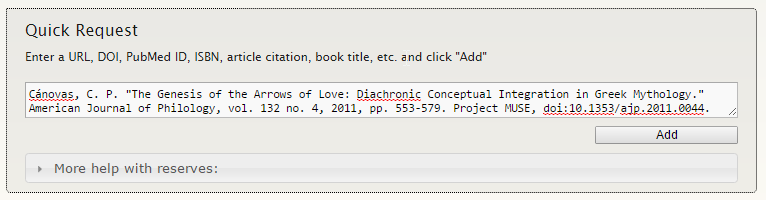
You can type almost anything into the new box at the top of the faculty class view to try to add a request to your course instantly.

image00

Above, we’re inserting an article by its citation; the new “Ocrifier” system can also handle ISBNs, DOIs, PubMed IDs, OCLC numbers, URLs, or Josiah IDs.

PASIG 2016 – Goodbye, Vine

So, Vine announced its shutdown while I was attending a digital preservation conference.

The Preservation and Archiving Special Interest Group meeting covered a lot of topics, with the first two days leaning towards technical work. We learned about data preservation initiatives, the infrastructure of The Smithsonian’s very own enterprise DAMS (!), and how MoMA is looking to digitize its film collection which, in total at 4K, would equal 80 Petabytes (!!!). Right before lunch on the second day, the news of Vine’s demise circulated all over the #pasignyc hashtag. I participated in a conversation on curation (“Do we need to save *all* the Vines? How do we choose which ones? Is ‘virality’ an elitist metric?”). Someone even estimated the size of a complete Vine archive. At the same time, non-archivists I pay attention to were reeling from the news. Sam Sanders, a political reporter at NPR, wrote in a series of tweets that Black users of Vine innovated and dominated the medium, and did so without suffering much of the abuse seen on other platforms like Twitter. Towards the end of this series, he said:

This ended up being completely relevant to the meeting’s third day. Archivists talked about working to include marginalized voices in digital preservation initiatives. One presenter talked about how “scrubbing” language of its diacritics ruined the context of a collection and showed a Western bias. Another discussed transnational partnerships between Western and non-Western institutions then recommended strategies for mindful and respectful collaborations.

I couldn’t help but think about Sanders’ tweet during these presentations. We as librarians and archivists are the experts in preservation, yes, but it’s important to remember that humans use computers, not the other way around (even if it feels that way sometimes). Mindful stewardship isn’t simply committing to long-term preservation of objects.

LibGuides + Canvas

LibGuides is a content management system developed by Springshare, a software-as-a-service company that makes several packages aimed at library customers. The Brown University Library uses LibGuides to publish online guides that help students and researchers discover appropriate library resources for their scholarly work. LibGuides is a common platform used by thousands of libraries[1], with basic templates and simple tools that allow librarians to share their knowledge, without having to learn the ins and outs of web publishing.

Instructional Design Librarian Sarah Evelyn asked me if there was any technological way that we could make LibGuides content show up in online Canvas[2] courses. Canvas supports the Learning Tools Interoperability (LTI) standard, but the version of LibGuides we use does not, nor does it have an open API.[3]

We met with Ed Casey and Marc Mestre, of CIS’ Instructional Technology Group, to develop a plan that would allow us to systematically include LibGuides content into Canvas. CIS shared with us information about how Canvas courses are constructed, including how standard course/SIS IDs from the Registrar’s Office are used to programmatically generate course identifiers. Each department has a three- or four-letter identifier unique to the department’s area of study (for example, Physics courses use PHYS as an identifier). We decided that we could use these identifiers in LibGuides to create a connection to Canvas.

The Library publishes two types of guides — subject guides and course guides. A subject guide includes links to journals, databases, and other resources on a particular topic. For example, we have a subject guide for Italian Studies (ITAL). A course guide is developed in collaboration with an instructor, highlighting resources that are relevant for use with that particular course, for example, this guide for an Italian Studies course on Machiavelli (ITAL0981).

I developed a schema to tag each subject guide with its SIS identifier, prepending an S- for subject guides, or C- for course guides, which Sarah added to each relevant LibGuide (using the examples above, the Italian Studies subject guide was tagged S-ITAL, and the Machiavelli course was tagged C-ITAL0981). Library programmer Yvonne Federowicz developed a system to harvest the tags from LibGuides into a database, and wrote a programatic service that makes those tags available to Canvas. Marc, in turn, wrote a feature in Canvas that uses that data service to create a direct link from any course to it’s related subject guide and, if available, its specific course guide. The new feature is available to any course when an instructor simply drags the “Brown Library Resources” item into the Course Navigation tab in Canvas Settings. Animated gif dragging Brown Library Resources feature to the navigation block

We hope that this feature will help students to easily discover high-quality scholarly resources, and more readily connect with the subject librarians in their areas of study.

—-

[1] https://www.springshare.com/libguides/
[2] Canvas is a learning management system used widely at Brown.
[3] Springshare’s LibGuides CMS product does support LTI, but we use the lighter LibGuides v2 product, so the LTI was not available to us.

Loris Image Server Deployment

iiif_image

We have been using the Djatoka image server for years in the BDR. However, we are currently in the process of switching to the Loris image server. Loris is a IIIF-compliant image server, and its development is led by Jon Stroop at Princeton. Loris is written in Python, and it uses the WSGI standard (like Django and other Python web frameworks).

Loris comes with a setup.py file for installing, but I’ve developed some scripts that can help with installing Loris on RHEL/CentOS 7. There are three main things that need to happen for Loris to work: setting up the Python environment, creating the configuration files and directories that Loris is looking for, and configuring Loris as a WSGI application that can be served by Phusion Passenger or other application servers. If you run my “install_loris.sh” script (as root), it will set up loris for you and you’ll be able to immediately test it out. Then you can go to update the configuration and/or install an application server for production.

Python Environment

Loris is written in Python, so it requires certain Python packages to be installed, including requests and Pillow. The packages can be installed to the system Python site-packages, but in my scripts I set them up to install to a Python virtual environment. There are also some system Linux packages that need to be installed before the Python packages – these include image packages, gcc for compiling a Pillow extension, and others.

Filesystem Configuration

My script installed Loris to /opt/local/loris. Loris needs a configuration file, and I put that in /opt/local/loris/etc/loris2.conf; cache, tmp, and log directories go in /opt/local/loris as well. My script installs Kakadu (for JP2 images – make sure you have the appropriate license) to /opt/local/loris/bin and /opt/local/loris/lib, and configures the shared library dynamic linking  to be able to load the Kakadu library from /opt/local/loris/lib.

WSGI application

I set up the loris WSGI app in /opt/local/loris/loris, where I copied the loris code. My script allows for two ways of running Loris – using a simple test server, and running a full application server.

If you just want to test the installation quickly, there’s a launcher.py file in /opt/local/loris/loris that uses Werkzeug’s run_simple command. To kick this off, just activate the python environment and run “python loris/launcher.py”.

For production environments, you can use an application server like Passenger. All you have to do is point the app server to the /opt/local/loris/loris and the passenger_wsgi.py file. I have a script called install_passenger.sh, and it installs the standalone version of passenger. After running that script, cd to /opt/local/loris/loris and run “passenger start”.

Brown University Library – Loris Install Scripts