
E-Newsletter
Recent Posts
Latest News
-
Orwig the Vote
|

In conjunction with the Brown Votes exhibit at the Rockefeller Library, the Orwig Music Library presents items from our collections related to voting, elections, and political activism in the United States. The material on display runs the gamut from the humorous: an enchanted frog for President; to the serious: songs for the disenfranchised and politically disillusioned.
Orwig the Vote will be on view at the Orwig Music Library from September 18 to November 8, 2024.
-
Streamlined Access to Full Text Articles
|
Brown has access to thousands of online journals, but sometimes it’s hard to know the quickest route to the articles you need. Streamline your research workflow with these tips!
Accessing full text articles via:
- LibKey Nomad, a browser extension for publisher websites and more
- BruKnow, the Library’s catalog and discovery tool
- Library Databases, search tools across the disciplines
- Google Scholar, beyond the Library
- A DOI or PMID, when you know exactly which article you need
LibKey Nomad

Would you like seamless access to our full text articles wherever you’re searching? LibKey Nomad is a browser extension that allows you to authenticate and download PDFs wherever our full text access is detected. The LibKey button appears in PubMed, on publisher websites, and even in Wikipedia references, as well as in some of our subscription databases. “Download PDF” or “Article Link” provides one-click full text access; “Access Options” helps you place an interlibrary loan request.
BruKnow
Searching in BruKnow? Click on “Download PDF” or “Available Online” to access the article.


If you’re in BruKnow and have expanded your results to resources outside Brown, click “No Online Access.”

Then login with your NetID and click “Request Article.”
Library Databases

Using one of our library databases? Look for “Linked Full Text,” “Full Text PDF,” or a similar link. If you don’t see that, a “find it” button, such as “Find it @ Brown,” “find it!” or “FindIt with BruKnow” will help you locate the PDF or request it through interlibrary loan.
PubMed

Searching PubMed? Start at our customized Brown PubMed link, then click on the “Find It” icon when viewing an abstract.
Google Scholar
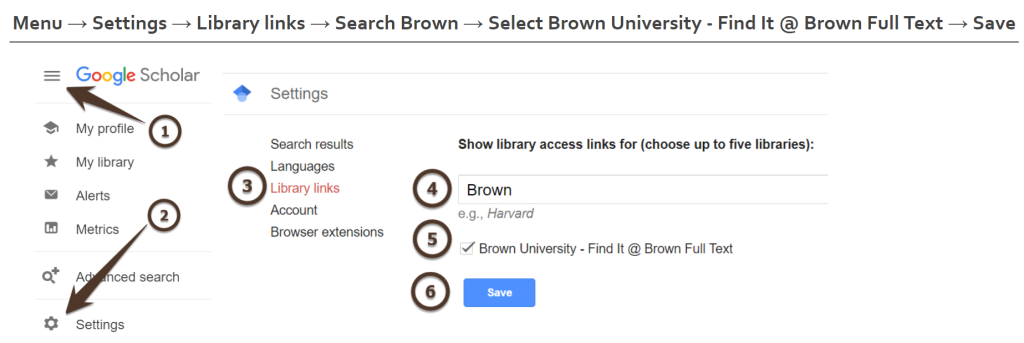
Using Google Scholar? Set Brown as your default library. Go to Settings and choose Library Links. Search for Brown, then select Brown University Library. Be sure to save your settings!
A DOI or PMID
Do you have the DOI or PMID for a specific article? Enter it at Libkey.io and LibKey will show you our access options.
-
Literature Reviews and Evidence Synthesis Projects in Health and Biomedical Sciences
|

Health and Biomedical Library Services (HBLS) supports traditional literature reviews and evidence synthesis projects, including systematic and scoping reviews. Librarian support on evidence synthesis projects continues to be a highly utilized HBLS service with librarians working on over 40 reviews in 2023 and 2024.
Request Process
We have updated our service guidelines and introduced a project intake form to manage requests and staff capacity better. To meet with a librarian about your project, please review the service guidelines and complete the intake form. Researchers should contact us early for assistance with their research projects. At this time, comprehensive reviews that require thorough literature searches across multiple databases (for example, systematic reviews or scoping reviews) may take the librarian two to three months from the first meeting to deliver results.
Please consult our Health Sciences Literature Reviews resource guide to learn more about the distinction between traditional literature reviews and evidence syntheses, methodology guidance, tools for searching and screening, and more.